

Reviewed · AUSTIN SIGHTSEEING & DRIVING TOURS
An Exciting Scavenger Hunt: Austin Capitol Sights & Downtown Gems
If you like city-walking with a mission, this fits. This app-led scavenger hunt strings together Austin’s big-name downtown landmarks into an interactive challenge game, and I like that you’re not stuck waiting for a set start time. You also get texted photo challenges and role-based tasks, so the hunt doesn’t feel like one long trivia quiz for everyone. One thing to consider: the experience depends heavily on your phone and the app experience, and one recent concern raised is that the app can be confusing if you expect strong step-by-step guidance.
The route is built for a smooth loop, starting at 1100 Congress Ave and ending back there, with a total time of about 2 hours. I also like that the hunt is designed as a private group activity, so only your group plays along, which makes it easier to keep your own pace. The main drawback is value: it costs $14.99 per person, and since it’s app-based, you’ll want to be comfortable using a smartphone for navigation and answering clues while walking.
In This Review
- Key things that make this Austin scavenger hunt different
- Austin Capitol Sights and Downtown Gems: What this hunt is really like
- Price and timing: Is $14.99 per person worth it?
- How the Let’s Roam app-led hunt works (and how to keep it from frustrating you)
- Your route on foot: From 1100 Congress Ave to Austin’s top downtown stops
- Stop-by-stop: What to look for at each Austin landmark
- 1) Millett Opera House
- 2) Wooldridge Square
- 3) Texas Governor’s Mansion
- 4) Austin History Center
- 5) Paramount Theatre
- 6) Moonlight Towers
- 7) Bremond Block
- 8) Austin Central Library (Austin Public Library)
- 9) Old Bakery & Emporium
- 10) Texas Capitol
- 11) Capitol Complex Visitors Center
- 12) The Contemporary Austin – Jones Center
- 13) Saint Mary Cathedral
- Photo challenges and points: How to make the “game” part fun
- What to wear, how to pace, and why weather matters
- Who should book this and who should skip it
- Should you book the Austin Capitol scavenger hunt?
- FAQ
- Where is the scavenger hunt starting point?
- How long does the Austin scavenger hunt take?
- Can I start at any time?
- Is there a tour guide with this experience?
- What do I need to bring?
- What’s included in the price?
- What isn’t included?
- Is it a private experience?
- Is there a minimum age requirement?
- What is the cancellation policy?
Key things that make this Austin scavenger hunt different

- App-led and self-guided: start when you want during the operating window, without a scheduled tour guide.
- Interactive, role-based challenges: each person gets their own tasks and can earn points with photo challenges.
- Austin landmarks in one loop: you hit a concentrated set of stops from the Capitol area to downtown theaters and squares.
- Designed for looking closely: clues are found in person on plaques, statues, art, and other details.
- Smartphone dependency: a fully charged device (or power bank) isn’t optional if you want this to feel smooth.
More downtown Austin puzzles to crack




Austin Capitol Sights and Downtown Gems: What this hunt is really like
This isn’t a guided walking tour where someone talks at you the whole time. It’s closer to a city game you play while you’re sightseeing—using your phone to move through a set route and complete challenges you can only do by being there.
You’ll get an app (the Let’s Roam app) and a mission tied to a specific downtown path. Instead of absorbing facts from a guide, you’ll chase them down on the ground—on signage, plaques, statues, and public art. That approach is surprisingly good in Austin, because a lot of the city’s character shows up in small details you’d otherwise speed past on your way to a photo.
You’ll also be handling challenges in a group. Each person can have a different role, and you’ll receive photo prompts by text in the app experience. If you enjoy friendly competition—who finds the answer first or captures the better photo—you’ll likely have a good time. If you hate phone-first experiences, you may feel annoyed fast.
And yes, one practical tension to expect: even though the app is meant to guide you, the experience is still puzzle-like. If you want a “turn left here, walk exactly two blocks, stop at this entrance” style of tour direction, you might find yourself guessing at points.
Price and timing: Is $14.99 per person worth it?
At $14.99 per person for roughly 2 hours, you’re paying for three main things: (1) access to the app mission, (2) the ability to play at your own pace without a guide schedule, and (3) a structured route through a lot of well-known Austin stops.
Here’s how to judge value for you:
- If your group enjoys walking and puzzles, the per-person cost can feel reasonable because you’re not just paying for entry fees or a lecture—you’re buying an activity.
- If your group wants a lot of downtime, sitting, or an indoor-heavy tour, this may feel short or too mobile for the price, since the hunt is built around outdoor clue-finding.
- If you thought you were purchasing one app for everyone, double-check your expectations. The price is clearly per person, and that mismatch in assumptions is exactly the kind of thing that can sour the experience.
The best-case scenario is simple: you show up with charged devices, you treat it like a game, and you stay engaged at each stop. When that clicks, it feels like good entertainment layered on top of sightseeing. When it doesn’t—especially if the app feels awkward—it can feel like you’re paying for something you could have guessed at alone.
How the Let’s Roam app-led hunt works (and how to keep it from frustrating you)
This is designed to be self-guided. You don’t need to meet a guide, and you can start at any time you choose as long as it’s within the operating hours window. That flexibility is a big deal in a city like Austin, where plans can change based on heat, timing, or dinner reservations.
Here’s the flow you’ll follow:
- Buy your tickets online.
- Download the Let’s Roam app and register.
- Redeem your tickets in the app.
- Use the app to guide you through each challenge.
- Follow the prompts, earn points, and complete tasks for the route.
Two things matter a lot for the experience to feel smooth:
- Battery life: the hunt uses your phone for navigation and interactions, so plan for a full charge. If you tend to run your phone down, bring a power bank.
- Mindset: expect to look up, look around, and interpret clues you find in public spaces. Even if the app is supposed to guide you, part of the challenge is figuring things out on location.
Also, you’ll be answering questions that can only be found in person, hidden on elements like plaques, statues, art, and more. That’s what turns a “walk around and take selfies” day into something more rewarding.
Still, be aware: if you get stuck or the location guidance doesn’t feel clear, you’ll lose momentum. One of the clearest complaints connected to this type of app game is that it can turn into generic trivia you could find anywhere else—plus extra effort to figure out where you’re supposed to go. You can minimize that risk by treating the app prompts as your primary source and not trying to power through without checking the screen regularly.
Your route on foot: From 1100 Congress Ave to Austin’s top downtown stops

The hunt starts at 1100 Congress Ave, Austin, TX 78701, and it ends back at the same meeting point. Total time is listed as about 2 hours, and the hunt duration is typically 1.5 to 2 hours once you’re in motion.
You’ll move through 13 named stops, which are concentrated enough to work well for a downtown walking loop. That said, the hunt isn’t described as an effortless stroll. It’s rated for moderate physical fitness, and you’ll want comfortable shoes. Also, you’ll likely pause often—at plaques, around public buildings, and for photo challenges—so factor in small delays that add up.
A simple way to enjoy this route is to pick your pace early:
- If you want a relaxed sightseeing vibe, slow down at each stop and spend a minute on the “find the clue” part before moving on.
- If you want to finish quickly and focus on photos, don’t let any one spot eat your time. If you’re stuck, move forward and come back if the app gives you enough hints.
The whole of Austin in one loop
Stop-by-stop: What to look for at each Austin landmark
This section is about what the hunt is asking you to do at each named stop—not about a deep museum history lecture. Expect on-the-spot clue hunting and prompts tied to the environment around you.
1) Millett Opera House
At the start stretch, use this stop to get your bearings. The hunt is designed around looking closely at plaques, statues, and details you can’t fully capture from a distance. If your app experience feels slow at the beginning, don’t panic—this is a good place to settle into the rhythm of reading prompts and scanning the area.
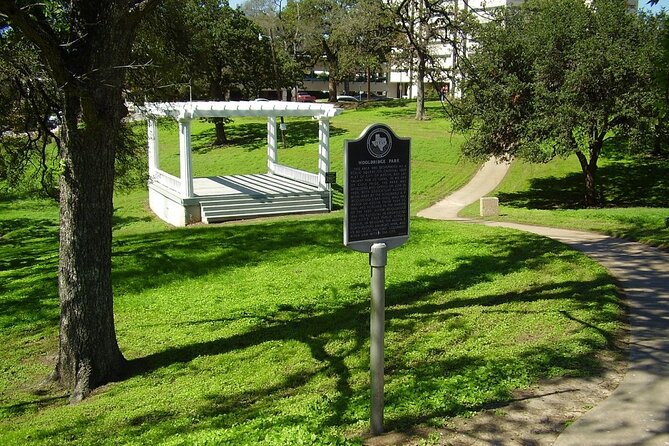
2) Wooldridge Square
This is where the hunt energy usually starts to ramp up. You’ll be hunting for answers that you find in person, and this is also the kind of stop where a photo challenge can feel natural. If your group is competing for points, Wooldridge Square is a good early moment to define what you’re trying to win.
3) Texas Governor’s Mansion
This is a high-recognition sight on the route. For your hunt, treat it as a “look for the clue” checkpoint rather than a photo-only stop. The value here is in practicing the game method: check the prompt, scan for the detail the game wants, then move on when you’ve got it.
4) Austin History Center
This stop is likely better for people who enjoy reading and searching. The hunt concept leans on facts you discover on-site, so you may spend a bit more time trying to locate the right plaque or information marker. If you tend to rush, you might miss the exact detail the question is pointing you toward.
5) Paramount Theatre
Theaters are often prime for scavenger hunt prompts because the surrounding exterior elements can have text, displays, and art. Expect the app challenges to pull you into close observation. If your group is into photography, this is a reasonable spot to slow down for one of the better-looking photo tasks.
6) Moonlight Towers
This is another place where you can expect the hunt to reward looking around rather than just standing in one spot. The tasks are designed to be answered from what’s in front of you, and towers/landmarks like this generally give you visual anchors for framing a photo challenge.
7) Bremond Block
When you reach this section of the loop, keep an eye on how the app is pacing you. This type of stop can be where you either enjoy the “wander and solve” vibe—or feel impatient. The key is to use the app prompts as your guide so your wandering stays purposeful.
8) Austin Central Library (Austin Public Library)
A library stop fits the hunt theme well: finding answers that are presented on location. For you, the takeaway is simple—expect to read what you find on-site and connect it to the question. If the app is asking you something that feels too general, pause and scan the immediate area the prompt seems to reference.
9) Old Bakery & Emporium
This kind of stop often works well for photo challenges because there’s usually plenty to frame in a single shot. Don’t just snap and move. Take the extra 30 seconds to verify the clue you need is the one the question is asking about.
10) Texas Capitol
By the time you’re at the Capitol, you’ve already practiced the hunt style: locate the on-site detail, answer the question, and complete the prompt activity. This stop is likely where you’ll feel the most “Austin energy” because it’s the center of the loop and your sightseeing goals are stacked here. For photos, aim for variety—one wide shot for context and one closer shot tied to the clue.
11) Capitol Complex Visitors Center
This is a natural mid-to-late “gather and confirm” point in the route. If you’ve had to guess at any earlier clues, this stop is where you can reset by checking the app prompt carefully and verifying you’ve got the correct detail before locking in your answer.
12) The Contemporary Austin – Jones Center
This stop fits the scavenger hunt model because art and signage are often “clue surfaces” in these kinds of games. If you like puzzles that reward attention to visual details, this is where your group can have fun. It’s also a logical spot for a photo challenge where creativity matters more than speed.
13) Saint Mary Cathedral
The end of the route should feel satisfying, not stressful. At this stage, you’ll either be close to finishing prompts or dealing with the last few. Try not to rush your last clue. Double-check what the app asks, complete it carefully, then enjoy the final photo moment without worrying about squeezing in extras.
Photo challenges and points: How to make the “game” part fun
Photo challenges are a core part of the experience. You’ll get prompts through the app, and you can earn points—especially if you’re playing as a group that likes friendly competition.
To keep this enjoyable (and not awkward), you’ll do best with two rules:
- Assign roles early. One person watches the app prompt, another scopes the clue area, and a third shoots photos. It saves time and avoids everyone crowding around the same spot.
- Treat photos as clue-linked. If the prompt suggests a specific type of scene, don’t just take a pretty shot. Aim for a photo that helps answer or complete the task.
If you’re worried about “winning” without being a professional, don’t. These games usually reward engagement and clarity, not camera gear. Plus, the bigger win is often that the photo prompts pull you back toward the landmarks you’d otherwise hurry past.
What to wear, how to pace, and why weather matters
This is a walk-and-search experience with frequent stops. The basic advice is straightforward: wear comfortable shoes and plan your outfit around the forecast. The app experience depends on your phone, so your phone habits matter too.
A few practical pacing tips:
- Start with a moderate pace so you don’t burn your energy before the Capitol-area portion.
- Expect pauses for scanning and photos. If you try to sprint, you’ll likely miss the clue detail and end up backtracking.
- Bring a power bank if you know your battery drops quickly.
Also, since it’s weather dependent in real life, check the conditions for the day you pick. If it’s hot, schedule your start for a time when you can comfortably walk and pause outside.
Who should book this and who should skip it
This scavenger hunt is a good fit if you:
- Prefer doing your sightseeing actively rather than listening to explanations.
- Like photo prompts and light competition.
- Want a self-guided experience where your group can start when it suits you.
- Enjoy discovering facts by looking at what’s in front of you on-site.
It may not be a great fit if you:
- Don’t want to rely on a phone for navigation and prompts.
- Get irritated when directions feel unclear or you have to guess.
- Expect a classic guided tour with smooth, step-by-step storytelling at every stop.
- Think of $14.99 per person as a steep price for an app-based game.
If your group is tech-comfy and likes the hunt format, you’ll probably enjoy it more than a strictly traditional sightseeing day. If your group is more “show me, don’t ask me,” you may feel impatient.
Should you book the Austin Capitol scavenger hunt?
Book it if you want a 2-hour way to cover major downtown sights and you enjoy scavenger hunt energy—role-based tasks, photo challenges, and clue hunting that forces you to look at details in person.
Skip it (or at least go in with eyes open) if you’re strongly anti-app navigation or if you hate puzzle friction. The experience relies on the phone, and if you end up fighting the guidance or feeling like you’re answering trivia you could find elsewhere, you may feel like the money didn’t buy what you expected.
If you do book: charge your phone fully, bring a power bank, wear walking shoes, and treat the hunt like a game you play with your group—not a substitute for a guided tour.
FAQ
Where is the scavenger hunt starting point?
It starts at 1100 Congress Ave, Austin, TX 78701, USA.
How long does the Austin scavenger hunt take?
It’s listed as about 2 hours, with each hunt typically lasting 1.5 to 2 hours.
Can I start at any time?
Yes. This is self-guided, and you can start at any time you wish, within the activity’s operating hours (8:00 AM to 5:00 PM, Monday through Sunday).
Is there a tour guide with this experience?
No. It’s an app-led, self-guided scavenger hunt.
What do I need to bring?
You’ll need a fully charged smartphone to use the app during the hunt. A power bank is recommended if you need one.
What’s included in the price?
The included item is access to the Let’s Roam app.
What isn’t included?
Parking and parking fees, food and beverages, admission tickets to entrances, personal expenses, and transportation costs are not included.
Is it a private experience?
Yes. Only your group participates.
Is there a minimum age requirement?
No minimum age is required.
What is the cancellation policy?
You can cancel for a full refund up to 24 hours before the experience’s start time. If you cancel less than 24 hours before, the amount paid is not refunded.
More Tour Reviews in Austin
- Best of Austin Small-Group Driving Tour with Local Guide
★ 5.0 · 2,275 reviews - Austin Biker Gang E-Bike Tour
★ 5.0 · 1,399 reviews - Austin Food Tour with Local Flavors, Tacos & 6 Food Tastings
★ 5.0 · 987 reviews - Double Decker Austin Single Loop Sightseeing Tour
★ 4.5 · 979 reviews - From Austin: Hill Country BBQ & Wine Shuttle
★ 5.0 · 954 reviews
Austin End to End
- Best of Austin Small-Group Driving Tour with Local Guide
★ 5.0 · 2,275 reviews - Double Decker Austin Single Loop Sightseeing Tour
★ 4.5 · 979 reviews - Austin and Hill Country Sightseeing Tour
★ 4.5 · 928 reviews - Austin and Hill Country Panoramic Sightseeing Tour
★ 5.0 · 310 reviews - Austin: Best of Austin Driving Tour with Local Guide
★ 4.9 · 248 reviews
More Austin Escapes to Crack
- The Escape Game: Epic 60-Minute Adventures in Downtown Austin
★ 5.0 · 358 reviews - Keep Austin Weird Scavenger Hunt
★ 4.0 · 51 reviews - Virtual Home Scavenger Hunt
★ 5.0 · 19 reviews - Outdoor Escape Room in Austin – Downtown
★ 5.0 · 19 reviews - The Escape Game: Epic 60-Minute Adventures in Austin
★ 5.0 · 8 reviews
Hot Off the Grill: New Austin Reviews
- Austin’s Treasures Private tour: A Heroic Downtown Discovery Walk★ 5.0 · 3 reviews
- Private Clear Kayak Tour on Lady Bird Lake in Austin, Texas★ 5.0 · 3 reviews
- Lake Austin Boat Cruise 1.5 Hour Scenic Tour BYOB Per Person★ 4.5 · 3 reviews
- Africa Hologram Adventure at Zoocade★ 3.5 · 3 reviews
- Go Tubing in Austin’s Downtown Spring River★ 5.0 · 3 reviews
Austin Sightseeing & Driving Tours, compared.
 ★ 5.0Best of Austin Small-Group Driving Tour with Local GuideFrom $492,275 reviews
 ★ 4.5Double Decker Austin Single Loop Sightseeing TourFrom $36979 reviews
 ★ 4.5Austin and Hill Country Sightseeing TourFrom $33928 reviews
 ★ 5.0Austin and Hill Country Panoramic Sightseeing TourFrom $73310 reviews
 ★ 4.9Best of Austin Driving Tour with Local GuideFrom $49248 reviews
 ★ 5.0Austin Sightseeing and Capitol Segway TourFrom $37246 reviews
 ★ 4.0Austin Premium Driving Tour with Sunset Boat CruiseFrom $94174 reviews
 ★ 4.5Austin Famous Ghost and Bat Segway TourFrom $69151 reviews
Browse the lists this tour appears in